
Screenshots
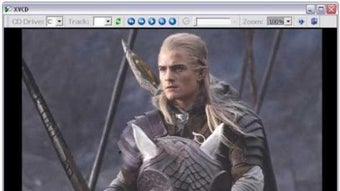

App details
- Version
- 2.0
- Size
- 559.74 KB
- Updated
- February 1, 2023
- Requires
- Windows 98
- Language
- English
- License
- Free
- Developer
- Xequte
- Category
- Windows OS
SoftPas in:
This product is also available in the following languages:
About VCD Player
Download X VCD Player – Free, Secure VCD Playback for Windows
Overview
X VCD Player, developed by Xequte Software, is a lightweight multimedia player designed specifically for playing Video CD (VCD) discs on Microsoft Windows PCs. The program focuses on a hassle‑free experience: once the required MPEG‑1/MPEG‑2 codecs are installed, users can insert a VCD, DVD PixPlay, or any compatible disc and start watching without digging through complex menus. Its clean, single‑window interface mimics the look of classic media players, offering large, easy‑to‑reach buttons for play, pause, stop, volume, and screen zoom. Because X VCD Player does not bundle unnecessary configuration screens, beginners can launch the app and begin playback within seconds. While the tool lacks advanced editing or subtitle customization, it compensates with rock‑solid stability on a wide range of Windows versions—including Windows 7, 8, 10, and newer 64‑bit builds. Whether you own an external USB optical drive or a built‑in DVD‑ROM, X VCD Player detects inserted discs automatically, reads the tracks, and streams them using the installed codecs. This makes it an ideal solution for users who still keep a collection of classic VCD movies or need a simple, reliable player for legacy media formats.
Key Features
- Native support for VCD, SVCD, XVCD, XSVCD, and MPEG video files.
- Automatic disc detection – play a track with a single click after insertion.
- Minimalistic single‑window UI that groups all controls in one place.
- Large, intuitive playback buttons (play, pause, stop, volume, zoom).
- Compatibility with DVD PixPlay discs for international markets.
- Works on both 32‑bit and 64‑bit Windows operating systems.
- Requires only MPEG‑1/MPEG‑2 codecs; no additional plugins needed.
- Simple right‑click logging for quick troubleshooting.
- Light installation footprint – less than 5 MB of disk space.
- Free to download and use for personal purposes.
The feature set is deliberately lean, targeting users who value speed and simplicity over a barrage of optional settings. By focusing on essential playback functions, X VCD Player reduces the chance of crashes or lag caused by conflicting codecs or overloaded UI elements. The inclusion of DVD PixPlay support widens the player’s appeal, allowing it to handle certain regional DVD formats that many mainstream players ignore. Although the interface is only available in English, the player reads hard‑subtitle tracks embedded in the video files, ensuring basic multilingual support without additional configuration.
Installation & Usage Guide
Step‑by‑Step Installation
- Download the X VCD Player installer from the official Xequte Software website.
- Run the
.exefile and follow the on‑screen prompts. The installer will place the program inC:\Program Files\Xequte\X VCD Playerby default. - During installation, you will be asked to confirm that MPEG‑1/MPEG‑2 codecs are present. If not, the installer offers a link to a trusted codec pack – install it before proceeding.
- Complete the setup and launch the application. No additional registration or activation is required.
First‑Time Use
When you open X VCD Player, the main window displays a drive selector at the top. Insert your VCD or compatible disc into any optical drive (internal or USB). The player automatically reads the disc’s file structure, lists available tracks, and highlights the first track for immediate playback. Click the Play button or double‑click a track name to start watching. Use the Zoom button to enlarge the picture, or right‑click the video area to view a brief log that shows codec usage and any playback warnings. Volume control is available via the slider, and the Pause/Stop buttons work as expected. Because the software is built for Windows, you can also drag and drop video files (e.g., .mpg, .mpeg) directly onto the player window for quick testing.
For users who prefer keyboard shortcuts, X VCD Player supports the standard spacebar (play/pause), Esc (stop), and arrow keys (track navigation). The simple design means there is virtually no learning curve; you can start watching a VCD within seconds of launching the app.
Compatibility, Performance & Pros / Cons
X VCD Player runs smoothly on Windows XP, Vista, 7, 8, 10, and Windows 11, supporting both 32‑bit and 64‑bit architectures. The program has been tested with external USB optical drives, making it a versatile choice for laptops and desktops without built‑in DVD drives. As long as the required MPEG‑1/MPEG‑2 codecs are installed, the player delivers jitter‑free playback, even on older hardware. Because the application does not load heavyweight visual effects, CPU usage stays below 5 % during normal operation, leaving ample resources for other tasks.
Pros
- Free and lightweight – minimal impact on system performance.
- Automatic disc detection eliminates manual browsing.
- Supports a broad range of legacy video formats.
- Simple UI that’s ideal for non‑technical users.
- Works with both internal and external optical drives.
- No ads or bundled third‑party software.
Cons
- Lacks advanced features such as subtitle customization or video filters.
- Interface language is limited to English.
- No built‑in codec installer – users must obtain codecs separately.
- No support for modern streaming protocols (e.g., HTTP, RTSP).
- Limited to Windows; no macOS, Android, or iOS versions.
Overall, the strengths of X VCD Player outweigh its shortcomings for its target audience—people who need a straightforward, reliable tool to play VCDs and related disc formats. Power users looking for extensive editing or streaming capabilities may want to explore alternative media players, but for everyday VCD playback the software hits the mark.
FAQ & Conclusion
-
Do I need an internet connection to use X VCD Player?
No. X VCD Player works entirely offline. The only online requirement is to download the installer and, if needed, a codec pack.
-
Can X VCD Player play video files from my hard drive?
Yes. Besides VCD discs, the player accepts MPEG, XVCD, SVCD, and XSVCD files. Drag‑and‑drop or use the Open menu to load local video files.
-
Is the software compatible with Windows 11?
Absolutely. The latest build has been tested on Windows 11 (both 64‑bit and 32‑bit) and runs without issues.
-
What happens if I don’t have MPEG codecs installed?
Playback may stall or produce a black screen. The installer will warn you, and you can download a free codec pack from the provided link.
-
Is there a portable version of X VCD Player?
Currently, Xequte Software only offers an installer version. A portable edition has not been released.
In conclusion, X VCD Player remains one of the most reliable free tools for playing legacy VCD and related disc formats on Windows PCs. Its straightforward interface, low system footprint, and broad codec compatibility make it an excellent choice for users who simply want to press play and watch. While power users may miss advanced customization options, the program’s stability and ease of use more than compensate for the simplicity. If you have a collection of VCDs gathering dust or need a dependable player for occasional disc‑based viewing, download X VCD Player today and enjoy hassle‑free playback.
Ready to get started? Download X VCD Player now – it’s free, secure, and designed for Windows.
Guides & Tutorials
How to install VCD Player
- Click the Download button above.
- Once redirected, accept the terms and click Install.
- Wait for the VCD Player download to finish on your device.
How to use VCD Player
This software is primarily used for its core features described above. Open the app after installation to explore its capabilities.
User Reviews
No reviews yet. Be the first to share your experience.
You may also like
more
Llama 2
Free-to-use large language model As the new addition to Meta’s arsenal of langua...

NotebookLM
Revolutionizing the note-taking and idea-generation process NotebookLM is an exp...

Github co pilot
AI-inspired software development and coding platform GitHub Copilot is a browser...

Google Gemma
Google’s lightweight AI models Introducing Google Gemma , a family of cutting-ed...

AI Image Enlarger
A free app for Windows, by ai-image-larger. AI Image Enlarger is a free software...

DALL E
AI-driven text-to-image transformation engine DALL·E is a free graphic and desig...